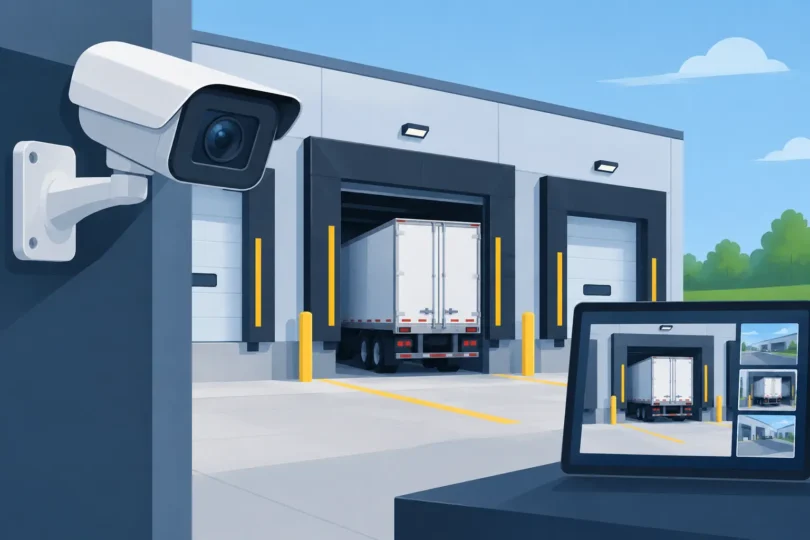

A loading dock is where inventory changes hands, trucks arrive at unpredictable hours, and one missing pallet can turn into an expensive argument. The best cameras for loading docks do more than show that a truck was present. They capture usable proof of who accessed the area, what was loaded or unloaded, the condition of goods, and when the transfer happened.
For Southern California warehouses, distribution centers, retail backrooms, and industrial facilities, a basic camera pointed generally at the dock is NOT enough. Harsh sunlight, headlight glare, deep shadows under dock canopies, moving forklifts, and license plates at vehicle speed all create conditions that expose weak camera systems. The answer is a professionally planned, wired surveillance system with the right camera assigned to each job.
Why Loading Dock Surveillance Is Different
A dock door is not one security zone. It is several: the vehicle approach, trailer exterior, dock apron, dock doorway, staging area, employee access point, and often a side gate or perimeter path. Each zone has a different distance, lighting condition, and evidence requirement.
A wide-angle overview camera can show the entire loading area, but it may not identify a driver’s face or read a plate. A camera aimed at a dock door can document an employee carrying a box, but it will not tell you which trailer left the property. Trying to make one camera handle every task is how blind spots and unusable footage happen.
The stakes are also higher than ordinary perimeter monitoring. Dock video may be needed to investigate cargo theft, delivery disputes, employee injuries, unauthorized after-hours access, damaged freight, or false claims that merchandise was never received. When police, insurers, vendors, or management need answers, grainy footage does not help.
Best Cameras for Loading Docks: The Right Mix
The right system usually combines several camera types rather than relying on a single expensive unit. Camera selection should follow the evidence you need to collect at each location.
4K Varifocal Cameras for Dock Doors and Staging Areas
A 4K varifocal camera is often the workhorse of a serious loading dock system. Its adjustable lens allows the installer to set the exact field of view after evaluating the dock, instead of accepting the limitations of a fixed wide lens. That matters when you need a tight image of the dock threshold, a specific pallet lane, or the area where freight is scanned and signed for.
Use these cameras where facial identification, package condition, employee activity, and hand-to-hand transfers matter. A 4K image provides more digital detail than lower-resolution cameras, but resolution alone is not the whole answer. Lens selection, mounting height, lighting, and camera angle determine whether that detail is usable.
Turret-style cameras are a strong option beneath covered dock areas because they are discreet, durable, and easier to aim precisely. Bullet cameras are often better for exposed exterior positions where a more visible deterrent and longer lens reach are needed.
Wide-Angle Cameras for Full Dock Coverage
A loading dock manager needs the big picture too. Wide-angle 4MP, 8MP, or multi-sensor cameras can cover the apron, multiple dock bays, parking lanes, and approach routes from a strategic mounting point.
These cameras are excellent for following the sequence of an event: a truck arrives, a trailer backs in, employees enter the work zone, a pallet moves, and the truck departs. They are not always the camera that provides a positive face identification, which is why they should support dedicated identification cameras rather than replace them.
For a large facility with several adjacent dock doors, a panoramic or multi-sensor camera can reduce the number of devices needed while preserving broad coverage. The trade-off is that panoramic images need thoughtful placement. If mounted too high or too far away, people and labels become too small for meaningful evidence.
License Plate Cameras for Vehicle Accountability
If delivery trucks, contractor vehicles, or suspicious after-hours traffic are part of the problem, install a dedicated license plate recognition camera. Standard security cameras are designed to observe a scene. License plate cameras are configured to capture plates under difficult conditions, including headlights, motion, and changing ambient light.
A plate camera should be aimed at a controlled entry or exit path, not asked to read every plate in a wide parking lot. Its angle, distance, lane position, and shutter settings must be set correctly. This is a specialized installation, but it creates a clear chain of vehicle evidence when a shipment disappears or unauthorized dumping occurs.
PTZ Cameras for Active Monitoring, Not Primary Proof
Pan-tilt-zoom cameras can be useful for large yards or dock complexes where security staff actively monitor live video. An operator can follow a vehicle, zoom toward suspicious activity, or inspect a gate area quickly.
However, a PTZ should not be your only camera over a critical dock door. While it is looking somewhere else, it is not recording the event directly below it. Fixed cameras create consistent, always-on evidence. PTZ cameras work best as an added layer after fixed coverage is in place.
Camera Placement That Produces Usable Evidence
Placement is where many loading dock systems fail. A camera mounted high enough to avoid damage can become too high to identify a face. A camera aimed directly toward the setting sun can wash out every afternoon delivery. A camera placed behind a parked trailer may cover nothing when you need it most.
Start with the dock threshold. Position a camera to capture people entering and leaving the facility through each active dock door. This view should show faces at an angle that allows identification, not just the tops of hats and hard hats.
Next, cover the staging and transfer zone. This is where pallets are set down, boxes are opened, and freight can be damaged or removed. A tightly framed varifocal camera is usually more valuable here than another extra-wide overview camera.
Then cover the vehicle approach and departure route. A general overview camera documents vehicle movement, while a dedicated plate camera records identifying information. If drivers check in at a gate, use an additional camera at the check-in point to capture the driver and vehicle together.
Do not ignore pedestrian routes, side gates, dumpster areas, and the space between dock bays. Theft and unauthorized access often happen outside the most obvious camera view. A professional site survey identifies these gaps before equipment is installed.
Lighting, Weather, and Night Performance Matter
Loading docks create difficult contrast. A bright California afternoon outside can meet a dark trailer interior, while nighttime operations add headlights, shadows, and reflective safety vests. Cameras need wide dynamic range to handle bright and dark areas in the same image.
Infrared night vision helps, but it has limits. Infrared can reflect off white trailers, metal roll-up doors, or nearby surfaces and reduce image clarity. In some locations, adding properly placed white-light illumination gives better color evidence and improves safety for staff working at night.
Exterior cameras should also be selected for the environment. They need weather protection, secure mounting, protected cable paths, and housings that can handle dust, vibration, and exposure. A camera is only dependable if its connection is dependable.
Do Not Build Dock Security Around Unreliable Wi-Fi
Wireless cameras can be convenient for a small temporary need, but they are a poor foundation for a commercial loading dock. Metal trailers, warehouse racks, concrete walls, forklift traffic, and distance can interfere with wireless signals. A missed connection can mean missing footage at the exact moment an incident occurs.
Professionally wired cameras provide stable power and data transmission. They also support higher-resolution video, dependable recording, and centralized management. For facilities with difficult coverage areas, structured cabling, dedicated network equipment, and properly designed wireless access points can support the whole operation without making critical cameras dependent on a weak signal.
Recording capacity matters as well. High-resolution 4K footage uses more storage than low-resolution video, especially across multiple cameras. Your system should be designed around the number of cameras, frame rates, retention requirements, and the real possibility that an incident may not be discovered for weeks.
Build a System Around Your Actual Dock Operations
The best equipment on paper can still fail if it is installed without understanding how your dock operates. A food distributor with overnight deliveries needs different coverage than a construction supplier, medical warehouse, auto parts facility, or retail receiving area. The camera plan should account for delivery schedules, trailer positions, traffic flow, high-value inventory, employee entrances, and current loss concerns.
LA Security Cameras has completed over 8,000 projects and understands that security footage must stand up when there is a real dispute, not merely look good on a phone app. A professional consultation can match 4MP, 8MP, and 4K cameras with the right lens, cable infrastructure, recording system, lighting, and access-control considerations for your property.
Before the next missing shipment, damaged pallet, or after-hours intrusion becomes a costly unanswered question, walk your dock with a security professional and identify what you would need to prove. The right camera system gives your team the evidence to act with confidence.